Showing posts with label edtech. Show all posts

Friday, October 4, 2019

Check out our VR Experience Library

Educational Technology has compiled and published our VR Experience Library, which provides an overview of the various apps, adventures, and games available on our Oculus Rift and Rift S systems. Highlights of our library include:

If you have recommendations on what else we might add to our library or would like to schedule a VR demo, feel free to reach out to us at edtech@lclark.edu.

Monday, August 26, 2019

edTPA: Video Recording and Video Editing


As the year comes to a close, Elementary and Secondary Teacher Education students are putting the final touches on one of the last assignments they submit before becoming teachers: edTPA. This final assignment is as complicated as it is important -- it requires students to record themselves teaching in a classroom, and will determine whether they will move onto having a classroom of their own.

Teacher Education students come into the edTPA process with various levels of video skills. Some students have had extensive experience recording videos, while others have never touched a video camera. To help students out, Ed Tech provides students with a handful of video recording and video editing workshop throughout the weeks leading up the the edTPA submission deadline, and offers them various handouts and videos for students to reference during submission.


Here are some of those instructional videos, so that you, too, can become a video guru!

(The camera used in the edTPA process, as well as the following tutorials and handouts, is a Canon Vixia HF R500)

Importing Video


Uploading Video


Importing AVCHD Videos


Google Calendar Appointment Slots - Perfect for Office Hours and Advising Appointment Sign-ups

Google Calendar's Appointment Slots makes it easy to create an online appointment sign-up sheet. Simply select days/times on your calendar you want to make available on your sign-up sheet and click Appointment Slots. Fill in details such as the length of each individual slot to create your own public appointment calendar. Email or post the link to your calendar appointment page and students can start booking appointments by clicking on available appointment.

For step-by-step instructions, see Google Help  Don't use Google Calendar? You might want to give the Moodle Scheduler activity a try.  

Tuesday, July 9, 2019

OER at the 2019 Faculty Technology Institute

At the annual Faculty Technology Institute (see our 2019 full schedule) we dedicate a single track
for a “deep dive” in a trending technology topic. This year, we chose to take a deep dive into Open Educational Resources, or OER:
Open Educational Resources (OER) are teaching, learning, and research materials that reside in the public domain or have liberal license terms that allow free access, use, adaptation, and redistribution by others. OER exist in a variety of formats and may include textbooks, readings, videos, assessment tools, modules, or entire courses. (Source: Watzek Library: OER Resources)
The affordability and flexibility of OER make them an attractive alternative to expensive and inflexible textbooks, though a number of important issues arise in their adoption in the curriculum. Our deep dive sessions for the week provided an overview of the OER adoption process. Feel free to click the links to view handouts, presentations, and resources related to our workshops!

To kick off our Deep Dive, we invited Amy Hofer, the statewide coordinator of Open Education Library Services. Amy presented the opening plenary Come for the student savings...stay for the academic freedom, which examined how ideas from the open education movement intersect with creative instructional design. Her 10:30 session Open Educational Resources: Adopt, Adapt, Author examined considerations in play when deciding between adopting OER as-is, adapting existing resources, or creating something entirely new. Finally, the afternoon session Beyond Resources: Open Educational Practices delved into open educational practices in pedagogy and assessment.

Subsequent sessions covered a range of topics which arise when working with OER. These included Finding & Using Open Content, Remixing and Creating OER, and—when it’s all in place and ready to go—Publishing OER content. Additionally, sessions like Student Collaboration in OER Projects explore how to get students involved in the development of resources, while Copyright, Fair Use, and OER addressed some concerns around finding and using existing free resources. Finally, our sessions extended into related concepts which while related to OER, also come up on their own. These include short ‘tapas’ sessions on topics like Creative Commons, Closed Captioning, Attribution, Universal Design, and Accessibility.

In the end, we understand that while we can learn a lot in a week, the process of thoughtfully incorporating OER into teaching takes time and consideration. If this is a topic you're interested in exploring, our own Watzek Library provides an excellent starting page (literally called "Start Here") where you can learn the basics, as well as get in contact with our resident OER advocate, Head of Access Services Jennifer Jacobs. Feel free to also reach out to Educational Technology for assistance with finding, developing and sharing digital resources.

Tuesday, June 11, 2019

Three General Tips for Digital Storytelling

Digital storytelling projects have become increasingly common in higher education. On our campus, video essays, StoryMaps projects, immersive 360 video stories, and even short Adobe Spark videos. We've dropped in for several in-class instructional workshops on the subject, and while the content of these sessions can vary by subject matter and medium, three overarching tips have remained central to our message.

Have a clear, concise summary of your project

You should be able to describe your video project in one sentence, similar to an elevator pitch. This sentence does not need to be included in your presentation, but it's good to articulate it for yourself. It can help provide focus and clarity as you proceed through the various steps of outlining, storyboarding, and adding media. On that note...

Always ask "Why?" when adding content

Once you have your main idea, you can then make decisions on how to present your project. Trying to determine which image to use? How much text? Video or not? Return to your main idea and ask yourself "how would this media help support this idea? Does this clarify my message or convolute it? Of course, you can't answer that question if you don't...

Get Feedback

As the creator of our project, we (should) know our message. The downside to being the creator, however, is because we understand what we're trying to do or say, we have blind spots to where the message is not as clear.  Your project should be able to stand on its own without you having to explain or clarify it, and you won't be able to test that without getting feedback—ideally from those who are not familiar with the subject matter.

Since we are not masters of the medium, here are some additional tips you might find helpful:

Wednesday, May 8, 2019

Designing a 3D Fluorimeter for the Field

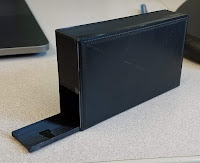
This semester I was approached by two chemistry students with a 3D modeling idea. Their goal was to design and print a working fluorimeter that could be used in the field with a smart-phone camera. They had already worked out specific design details on paper, but had no experience with 3D design or printing.  

Fluorimeter Design Sketch
Backing up for a moment, let's see what a fluorimeter is actually for:

(via Wikipedia) A fluorometer or fluorimeter is a device used to measure parameters of fluorescence: its intensity and wavelength distribution of emission spectrum after excitation by a certain spectrum of light. These parameters are used to identify the presence and the amount of specific molecules in a medium. Modern fluorometers are capable of detecting fluorescent molecule concentrations as low as 1 part per trillion.

An everyday example of fluorimeter use is in the dairy industry where fluorimetry is used to verify successful pasteurization of milk. If the milk glows, it's not pasteurized!  

I introduced the students to Tinkercad, a beginner-level, but capable online 3D modeling program.  After a few iterations and modifications we were able to design the fluorimeter housing to hold a laser and a special lens adapter.  

3D Model -- Fluorimeter Housing

The 3D printed version

The students presented and demonstrated the fluorimeter/smart phone combo for their final chemistry lab this week. Look for future updates with photos of the device at work.


Monday, April 22, 2019

A Virtual Courtroom


In March,  EdTech hosted a two day VR showcase at our Law School.  As students walked by, we encouraged them to try out a VR experience on the Oculus Rift.  As usual "Richie's Plank Experience" was a big hit and great conversation starter.  And conversation is really what we're after as we explore the meaningful, educational aspects of virtual reality.

One conversation revolved around how we could leverage VR in a courtroom setting to help law students practice speaking to a judge and the court.  The idea here is that virtually practicing speaking could help a student be more polished when they have to speak in a real-life courtroom with real-life judges.

As fate would have it, the law student who presented this idea was able to secure time in a courtroom downtown.  Julio and I packed up our InstaPro 360 VR camera and spatial audio mics and headed to the Multnomah County Courthouse.  We were led to a courtroom where we set up our equipment,  had to opportunity to don Judge's robes, sit at the bench and silently impersonate a Judge for 15 minutes.  This was ok-ed by the real Judge, so I believe Julio and I are not in any legal trouble!

Afterwards,  I processed and edited the VR video and posted it to YouTube where, if you have a set of VR goggles, you can virtually be in the courtroom to experience what it's like to have judges and a bailiff stare at you for ten minutes while you practice speaking to them.

The video is fairly simple in it's current form.  The next step would be adding layers of interactivity to the video, like fielding questions from the judges or having virtual notes to guide as you speak.

If you, of the LC community, have an idea of how VR could enhance or complement your work, EdTech is all ears.  Grab some VR goggles and check out the video below:


https://youtu.be/QdyR7LrYCjI

Tuesday, March 19, 2019

Assembling Affordable and Accessible Course Materials Workshop

Open Education Resources Image
On January 17, 2019 the Faculty Library and Educational Technology Committee sponsored a half day workshop to help faculty build collections of course materials that are effective and affordable for students.

Jen Jacobs kicked off the workshop with an overview of Open Educational Resources and the issue of textbook affordability. She also shared the results from a Fall 2018 student survey on textbook use and affordability. Next, a panel of faculty members shared their strategies for assembling course readings using open educational resources, materials students can freely access through the library, and open materials on the web. Small groups of faculty then met to share ideas for future projects.

Interested in learning more? Check out Watzek's OER subject guide or sign up for the OER Deep Dive at the Faculty Technology Institute this May!


Tuesday, March 5, 2019

Zotero Updates for 2019


Zotero is a combination of software and online service that helps researchers collect, manage, and cite research sources. At Lewis & Clark, we recommend and support Zotero.

Why Zotero? 

  • It's free and open source
  • It's easy to use and works on your web browser
  • It supports collaboration
  • It is powerful, flexible, and has a robust developer community

Zotero

Getting Started

Zotero helps new researchers organize sources and supports popular bibliographic styles used at Lewis & Clark. Zotero can automate the process of creating a properly formatted biography which can be a big help for those working on a thesis or other large research project with extensive citations. For those looking to get started, check out our Getting Started Check List or contact us to schedule a consultation. We're also happy to schedule and tailor a workshop for your class or groups of five or more.

New for 2019

We're most excited about Zotero's Google Docs integration which is now built-in to browser connectors.  The Zotero community has also been working to make it easier to find and download freely available PDFs for scholarly articles. For a complete list, see the Zotero changelog.

Tuesday, February 5, 2019

Updates to EdTech Training Offerings and Resources

Curricular EdTech Workshops page

Interested scheduling a digital skills workshop for your class? Educational Technology has compiled a list of curricular EdTech workshops we have offered in the past. Whether you are interested in one of those listed, or have a nother subject in mind, use our contact form to give us the details. We will do our best to work with you to design a workshop that meets your class needs!

We have also added a shortlink for our Moodle Resources page at go.lclark.edu/moodlehelp. This page covers issues most commonly encountered by Moodle users in the L&C community. A general Moodle help resource is also available onine at docs.moodle.org. If you haven't checked them out before, we also have resource pages for general IT topics as well as a dedicated page for G-Suite-related topics.