Showing posts with label how to. Show all posts

Friday, September 8, 2017

Theme Quirks in Moodle 3.3

With a new software upgrade comes new features and functionality as well as unforeseen issues. We know many Moodle users prefer to use alternate themes (Administration > Edit Settings > Appearance > Force Theme) to customize the look and feel of their courses. Unfortunately, some of our non-responsive themes are not playing nice with upgrades.

For example, users have reported when adding users in Moodle 3.3 using the Nonzero theme, the “Enroll Users” window appears transparent.


While it may be difficult to see, the “Enroll users” function still works as normal. Be advised, however, that these design quirks may appear in other aspects of the theme, as well as in other older themes.

While ignoring some of these visual quirks is one option, you may also consider trying a different theme. The new “Boost” Theme features a clean design that maximizes screen space and includes dynamic navigation tools such as a left sidebar that may be toggled on or off.


Wednesday, September 6, 2017

Moodle 3.3 - New Location for Switch Role & Grades


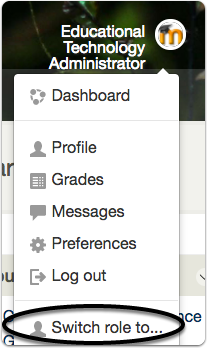
Moodle 3.3 has new locations for Switch Roles and Grades 


Switch Roles is now located in the user menu which is located in the top right of the screen in most themes. This menu is not supported by older themes.


To view grades for the current course, use the Grades link in the Navigation menu. To see a list of all enrolled course gradebooks, use the Grades link in the User Menu.
Grades link in new Boost theme


Grades link in default Moodle theme


Tuesday, February 14, 2017

What can .edu do for you?

Having an @lclark.edu email address gives Lewis & Clark faculty, staff and students free perks when it comes to Google Apps use and Google Drive storage. In addition, having a .edu address of any sort provides many more perks, both for work and pleasure. Here is a short list of the many offerings available:

- 50% off Spotify Premium and Apple Music
- 60% off Adobe Creative Cloud, for one year
- 96% off Corel products
- Amazon Prime Student - Free for 6 months
- Autodesk software for free
- Discounts on Dell Products
- Free digital subscription to The Washington Post
- Github Student Developer Pack
- New York Times Digital Edition for $1 per week
Prezi subscription
- Rotating discounts at Best Buy
- Save 10% or more on Microsoft Products
- Six months of LastPass
- Some discounts on Apple Products


Tuesday, October 11, 2016

Five Things You Can Do During Cyber Security Month


October 2016 National Cyber Security Awareness Month LogoAs we celebrate National Cyber Security Awareness Month here are five things you can do to stay safer and more secure online:


1. Change your Password

A good strong password is the root of all good security.  According to the traditional advice — which is still good — a strong password:
  • Has 12 Characters, Minimum. A longer password is even better.
  • Includes Numbers, Symbols, Capital Letters, and Lower-Case Letters
  • Isn’t a Dictionary Word or Combination of Dictionary Words
  • Doesn’t Rely on Obvious Substitutions. For example, “H0use” isn’t strong just because you’ve replaced an o with a 0.
You may also want to consider using a password manager or increasing the security of your passwords by using two factor authentication.

2. Make sure your Mobile Devices are secure

3. Run a virus scan

4. Update your Operating System and other applications

  • Set aside time to install updates. even if they require you restart your computer. If you haven't updated in a while, you may need to run updates and restart a few times.
  • Make sure that your various applications, including your web browsers, are running the most current versions.
  • Don’t forget to also update your web plugins (i.e. media players like Adobe Flash and file viewers like Acrobat Reader.

5. Make sure that you have a backup strategy in place and are backing up regularly. 

Check out Tips for Backups for L&C specific advice. 

For even more suggestions, check out Consumer Report's 66 Ways To Protect Your Privacy Right Now and our own Information Technology Security Awareness site.

Tuesday, August 2, 2016

LC Google Apps Updates - June/July

A "Totally Rebuilt" Google Sites is on the Horizon - 06/13/2016

In the coming year, Google has announced a "massive overhaul" of Google Sites, rebuilding it almost entirely from the ground up. which will include drag & drop functionality, real-time collaboration, responsive design, and even mobile-friendly layouts. An exact release date has not been announced, but the new Sites is currently being tested through the Early Adopter Program and is expected to be released in 2017.


New Settings for 2-Step Verification - 06/20/2016

2-Step verification provides an additional layer of security when protecting your account. Users may now choose from multiple verification options by visiting the "My Account" area and navigating to Sign-in & Security > Signing in to Google > 2-Step Verification. Options include entering a security key from the Google Authenticator App, receiving a verification code via text, or receiving a mobile popup.

Choose a file’s folder location when you make a copy in Google Docs, Sheets, and Slides - 7/18/2016

This update addresses a minor Google Drive annoyance: when duplicating a file in Google Docs, you may now specify a location for the copy, rather than the copy automatically appearing in the location of the original. While the Google Apps release calendar indicates the feature would be available August 1st, it is currently not available. We'll be sure to announce via Twitter when it becomes available.

Mobile Updates

Wednesday, April 6, 2016

Google Apps Updates - February/March

For our inaugural LC Google Apps update, we'll summarize the Apps Updates of the past couple months, as well as one notable late-2015 update. These updates do not cover every Google Apps Update (you can find those here), but rather those that are relevant to our users and currently active on our Apps for Education domain. Click on the heading link for more information regarding a particular update.

Google Apps Status Updates

While this is not necessarily an apps update, it may prove useful in a pinch. Running into a lag trying to access Google Drive? Gmail acting up? There might be a known issue. Visit www.google.com/appsstatus for Apps Updates.


Keep in mind, however, that if the issue is recent enough, it may not yet appear on Google Apps updates, as they only update once the existing issue has been confirmed on Google's end. For even more up-to-the-minute results, consider searching Twitter to see if anyone else is experiencing the same issue.

Google Hangouts may now be attended by external users without Google Accounts - (11/19/2015)

This late-2015 update added the ability to invite non-Google users to join Google Hangouts. By adding a Google Hangout to a calendar invitation, external users may join a hangout as a guest by clicking the hangout link. Note: Hangout organizers must have a Google Account to create a hangouts session.



New People Icon for Quick Sharing Info - (2/16/2016)

When you open a shared Google Drive folder the "people icon" appears to the right of the name, which provides a quick glimpse others who have share access to the folder.


Text-to-Columns in Google Sheets - (3/01/2016)

Found under Data > Split text to columns, you can now split delimited data across columns with a single click.
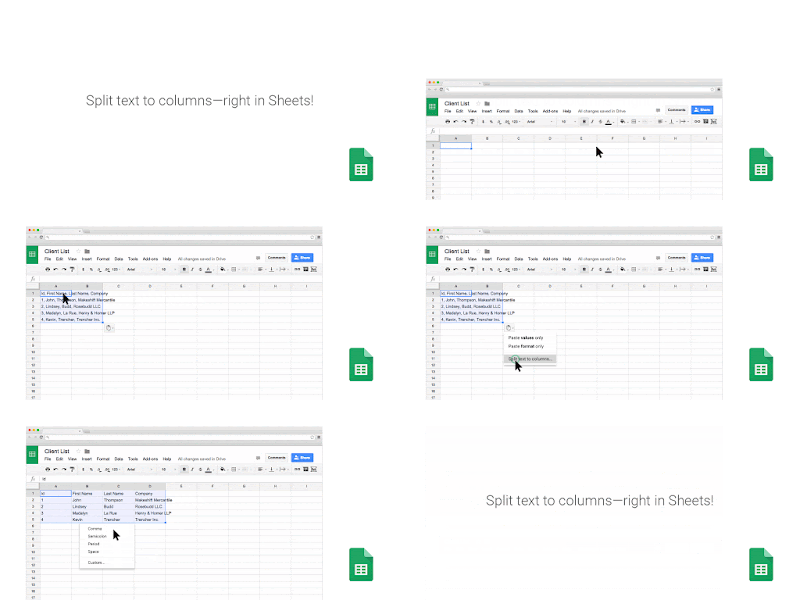

Image via Google Apps Update Blog

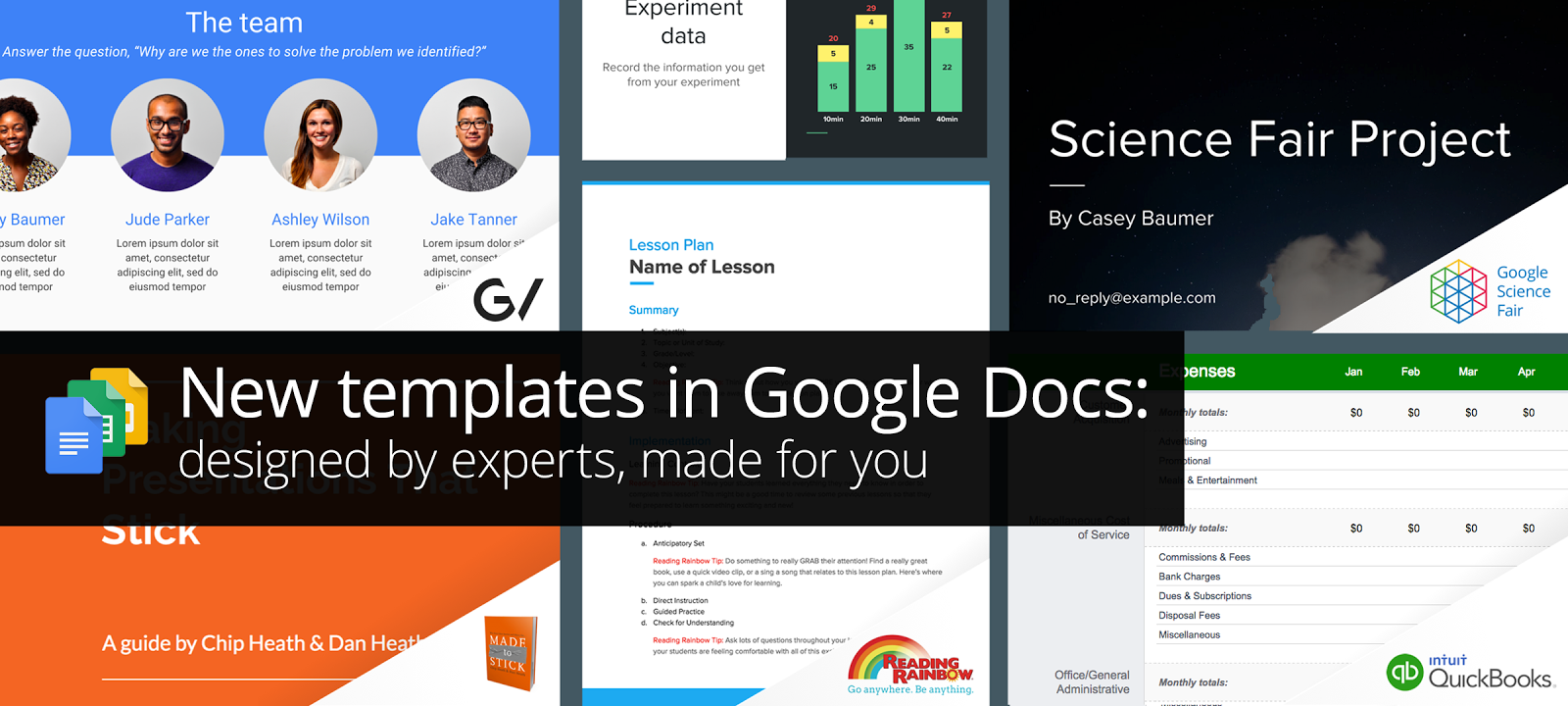
Google Apps Templates - (3/02/2016)

Google has added several new templates to Docs, Sheets, and Slides.


Export as EPUB - (3/07/2016)

Are you publishing a document to Kindle, Nook, or another form of eReader? Google Docs may now be exported in EPUB format, the preferred eReader format. This is found under File > Download as > EPUB Publication (.epub)


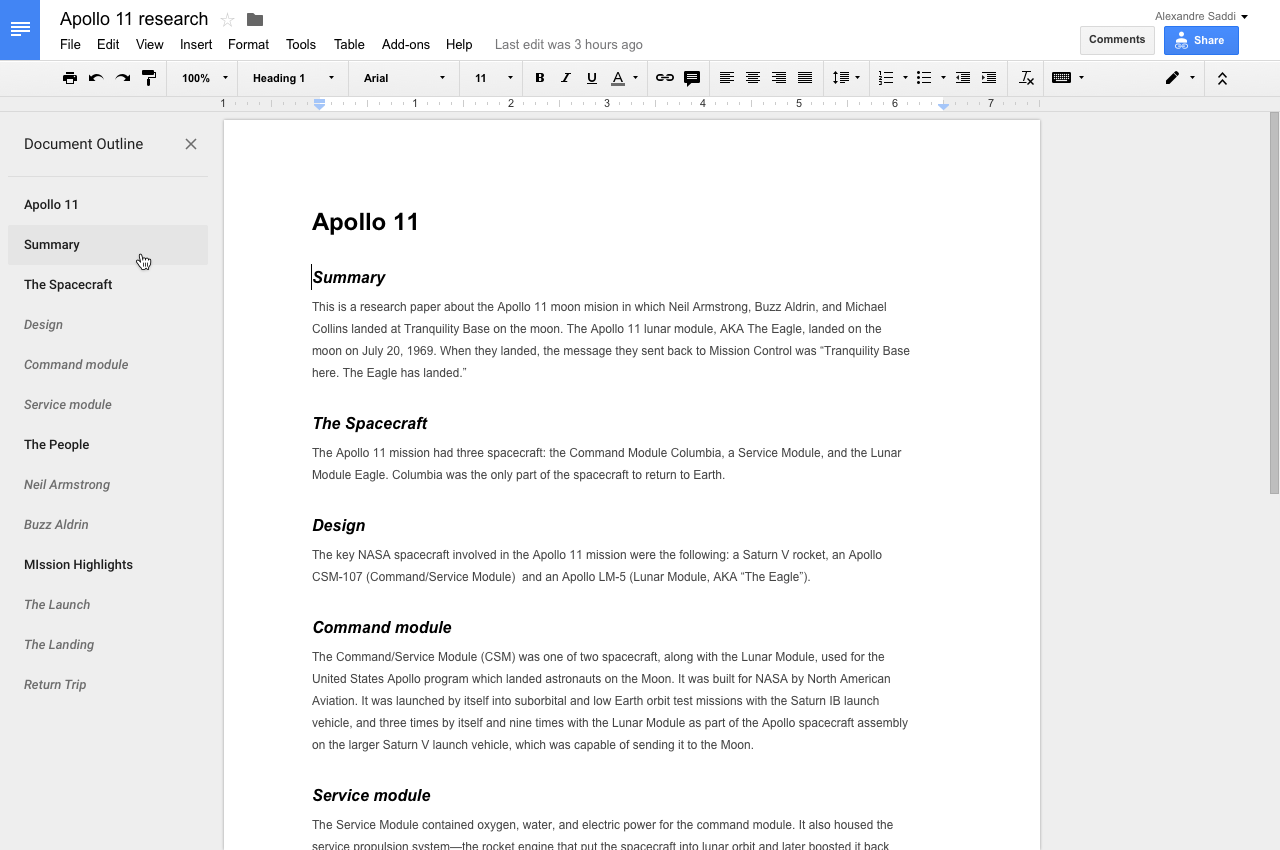
The new outline tool in Google Docs - 3/09/2016

The outline tool displays a document outline in the left panel. The tool will attempt to create an outline from existing headers, and may apply headings (which can be changed later) if none exist to create an outline.


Set expiration dates for access to Google Drive, Docs, Sheets, and Slides - 3/15/2016

As of Tuesday, April 5th, users may now set expiration dates for Google Docs, Sheets, and Slides. This will prove to be an extremely useful feature for those who need more flexible control of access permissions in Google Drive.
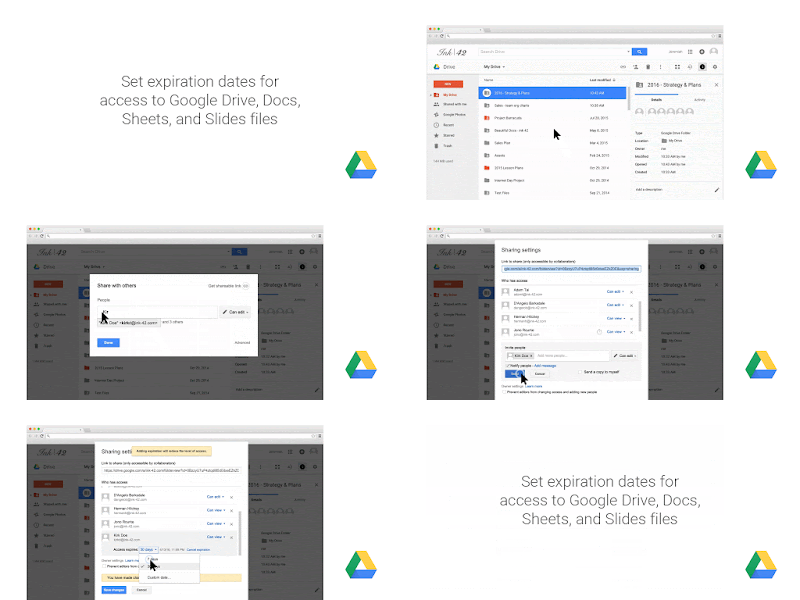

Image courtesy of Google Apps Updates blog


Google Apps for Mobile Updates

Google has launched a number of updates to its apps on Android & iOS platforms. We won't go into each one in great detail, but here's a quick recap:

Wednesday, September 2, 2015

Office 365 for Students and Faculty


Image result for office 365Microsoft Office 365 greatly expands the ability of students and faculty to collaborate and share documents. Now students and faculty can get Office Online for free through Microsoft's Office 365 Education program. In addition, Lewis & Clark's Microsoft Campus Agreement permits students, staff and faculty to download full versions on up to 5 personally owned Mac or Windows computers. 


This is for personally owned machines only. If you have questions about Office on institutionally owned machines, please contact the Service Desk.

To get started:
  1. Go to the Microsoft Office in Education website.
  2. Click on the appropriate tab (Students or Teachers) and click the greet button, Get started for free.  You'll be prompted for your school email address. Once you enter it, you'll be sent an email with instructions on how to activate your Office 365 Education account.


Thursday, August 13, 2015

Free Online Course on Copyright for Educators & Librarians

At our Digital Media Workshop this week, we discussed Copyright concerns when using media in digital projects. For a good detailed overview on Copyright and Fair Use, check out this free, on-demand course offered by Duke University, Emory University and the University of North Carolina at Chapel Hill.

Wednesday, July 22, 2015

Use Microsoft Office to Edit Documents Saved in Google Drive

As of today, Google has introduced a plugin for Microsoft Office allowing users to use Word, Excel, and PowerPoint to open their Office files stored in Drive. Previously, Google Docs allowed users to save Office Documents (as well as most other file formats) to Drive, but editing required users to convert the document to Google Drive format, which sometimes led to confusion and multiple versions of the same document.
  • You may save files in Office directly to Google Drive by selecting File > Save As and selecting Google Drive as the destination.
  • Using Microsoft Office to edit Office documents shared with you through Google Drive is now quicker and easier.
  • Users who prefer Google Drive 
Google Docs opened using the Microsoft Office interface will still open in your browser, but should you want to add Office features to your Google Docs, you can download as a Microsoft Office document, open in an Office program. Microsoft Office integration does not yet extend to Office for Mac, nor is it a part of Office Online (which allows storage to Dropbox and Microsoft OneDrive), but the Microsoft Office desktop plugin should be a must-have for Office devotees.
Further Reading: