Showing posts with label GSuite. Show all posts

Thursday, July 25, 2019

Talking Google at the 2019 Faculty Technology Institute

While the 2019 Faculty Technology Institute went a bit lighter on Google topics, we still snuck in a
few classes covering some of our most frequently asked questions. Below is a general summary of Google at the 2019 FTI, as well as links to some helpful and related resources.

We regularly offer What's New with G Suite? as a way of keeping on top of the ongoing and evolving G Suite platform. The session opened with a general review of what it means to be a G Suite campus and where to find more information about updates and outages. This was followed by an overview of features that have appeared over the past year, including smart compose, scheduled send, and the end of Google Drive Desktop (hello Drive File Stream!).

An upcoming change to G Suite that warranted it's own (mini)session was Google's answer to Slack, the new-and-improved Hangouts Chat. Offering an open, collaborative, and persistent communication option for teams, Hangouts Chat will eventually replace the current iteration of Google Hangouts. For more information, check out our previous blog post, which covers the changes and improvements in more detail.

Does an empty inbox at the end of the day sound like a dream come true? It doesn't have to be. In our Zero Inbox in Gmail session, we covered a few general tips on how you can get there. These included utilizing a proper to-do list application, leveraging Gmail's robust search function, and using filters and labels to auto-sort incoming mail.

With unlimited storage available in Google Drive, it's easy to let organization fall to the wayside. Similar to Zero Inbox, the Organize Your Google Drive class dug into many of the existing tools and features in Google Drive to help maximize organization and productivity. With so many options available, we've found that rather than merely telling users how to use it, it is often more helpful to help users understand what they can do and where to go for more information.

As always, users in the L&C community can always reach out to us with questions regarding G Suite features and functionality. Send your inquiries to itservice[at]lclark.edu and we will get back to you as soon as we can.

Wednesday, April 10, 2019

Changes on the Horizon for Google Hangouts

Hangouts Icon | Android L Iconset | dtafalonso
Google Hangouts
If you're tuned into news regarding all things G Suite, you may have heard Google Hangouts will be discontinued in the near future. This message is somewhat misleading. More specifically, Google Hangouts will become "Classic" hangouts as they transition to the newer iteration Hangouts Chat designed for organizations using the enterprise G Suite (as opposed to the public gmail.com). This new iteration will appear first to Enterprise clients, which includes G Suite for Education, before eventually replacing Classic Hangouts at some point in the future.

If you have used Google Hangouts in the past, you currently have the ability to download and install Hangouts Chat for Windows desktop, and Android, iOS. It is not yest available as a desktop install for Mac, but may still be used through your Gmail homepage. Keep in mind, also, it is only available for your lclark.edu account and not for your personal gmail.com account.

Hangouts Chat will bring increased functionality, including features like dedicated virtual rooms, threaded conversations, and progress tracking (similar to Slack). More importantly, these features will be integrated with the existing Google Suite and designed to work seamlessly alongside apps like Gmail and Google Docs. We'll keep an eye on updates and provide additional information as it becomes available.

Tuesday, February 5, 2019

Updates to EdTech Training Offerings and Resources

Curricular EdTech Workshops page

Interested scheduling a digital skills workshop for your class? Educational Technology has compiled a list of curricular EdTech workshops we have offered in the past. Whether you are interested in one of those listed, or have a nother subject in mind, use our contact form to give us the details. We will do our best to work with you to design a workshop that meets your class needs!

We have also added a shortlink for our Moodle Resources page at go.lclark.edu/moodlehelp. This page covers issues most commonly encountered by Moodle users in the L&C community. A general Moodle help resource is also available onine at docs.moodle.org. If you haven't checked them out before, we also have resource pages for general IT topics as well as a dedicated page for G-Suite-related topics.

Wednesday, April 25, 2018

Google Ending Support for Google Drive Desktop May 12th, 2018

Google will officially shut down Google Drive Desktop on May 12, 2018 and has offered two replacement options: Google Backup & Sync and Google Drive File Stream. 


IT recommends that users who wish to continue to have desktop access to their lclark Google Drive use Google Drive File Stream. Google Backup & Sync is the recommended option for personal (gmail.com) Google accounts.

Google Drive File Stream is a flexible sync tool designed for G Suite for Education users. Similar to using a network share drive, it makes your Google Drive available through mounting your drive, giving you access to your entire drive while you're connected to the internet. If you're concerned about not having internet access, you have the option to make specific folders available offline. To do that, once installed, you would navigate to the folder on your computer, right-click the file or folder you wish to make available offline, and select Drive File Stream > Available Offline.


Uninstall instructions are available here for Google Drive Desktop. Google provides help documentation for Google Drive File Stream, but feel free to reach out to the IT Service Desk if you have additional questions.

Thursday, February 23, 2017

G Suite - Winter 2017 LC Update Highlights


It's been a little while since our last update, but here are G Suite Updates that are now available to our users. For a look at what's on it's way, you can check out the G Suite Updates Blog or the G Suite Launch Release Calendar (we're on the Scheduled Release track).

Link to Cell Ranges in Google Sheets (02/13/2017)

With this new functionality, you can create a “table of contents” for your spreadsheet, direct others to specific content within your spreadsheet, and retain links to cells when you import spreadsheets from other applications. To link to cells in your spreadsheet, simply go to "Insert link" > "Select a range of cells to link" and type or highlight the desired range.


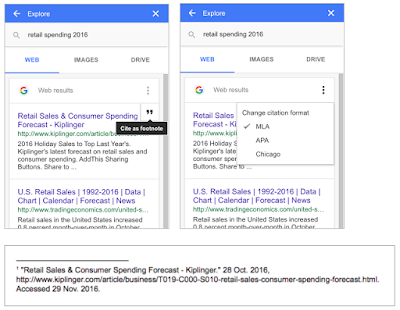
Quickly and Easily Cite Your Sources with Explore in Google Docs (12/05/2016)

Google has enabled quick and easy citation through the Explore feature. Users may now directly add citations in MLA, APA, and Chicago formats from within the Explore window.


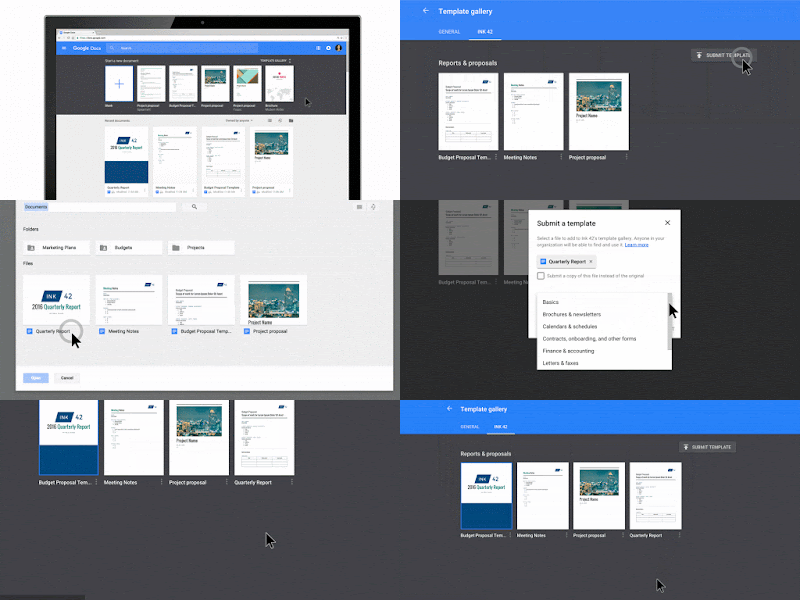
Save time with new custom templates in Docs, Sheets, Slides and Forms (11/16/2016)

As you've probably noticed, templates are now available from the Docs, Sheets, Slides and Forms home screens. Not only can you utilize existing emplates, you may also submit new ones of your own.


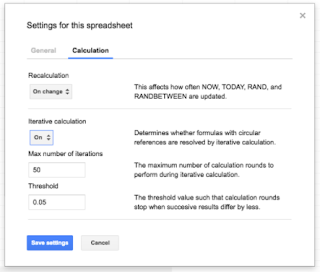
New iterative calculation settings and more in Google Sheets (12/06/2016)

To prevent the errors that sometimes plague complex calculations, today we’re launching a new setting in Sheets on the web (File > Spreadsheet settings > Calculation > Iterative calculation) that allows you to set the maximum number of times a calculation with a circular reference can take place.