Showing posts with label LC. Show all posts

Wednesday, May 8, 2019

Designing a 3D Fluorimeter for the Field

This semester I was approached by two chemistry students with a 3D modeling idea. Their goal was to design and print a working fluorimeter that could be used in the field with a smart-phone camera. They had already worked out specific design details on paper, but had no experience with 3D design or printing.  

Fluorimeter Design Sketch
Backing up for a moment, let's see what a fluorimeter is actually for:

(via Wikipedia) A fluorometer or fluorimeter is a device used to measure parameters of fluorescence: its intensity and wavelength distribution of emission spectrum after excitation by a certain spectrum of light. These parameters are used to identify the presence and the amount of specific molecules in a medium. Modern fluorometers are capable of detecting fluorescent molecule concentrations as low as 1 part per trillion.

An everyday example of fluorimeter use is in the dairy industry where fluorimetry is used to verify successful pasteurization of milk. If the milk glows, it's not pasteurized!  

I introduced the students to Tinkercad, a beginner-level, but capable online 3D modeling program.  After a few iterations and modifications we were able to design the fluorimeter housing to hold a laser and a special lens adapter.  

3D Model -- Fluorimeter Housing

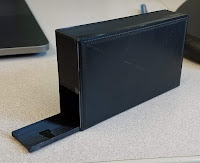
The 3D printed version

The students presented and demonstrated the fluorimeter/smart phone combo for their final chemistry lab this week. Look for future updates with photos of the device at work.


Monday, April 22, 2019

A Virtual Courtroom


In March,  EdTech hosted a two day VR showcase at our Law School.  As students walked by, we encouraged them to try out a VR experience on the Oculus Rift.  As usual "Richie's Plank Experience" was a big hit and great conversation starter.  And conversation is really what we're after as we explore the meaningful, educational aspects of virtual reality.

One conversation revolved around how we could leverage VR in a courtroom setting to help law students practice speaking to a judge and the court.  The idea here is that virtually practicing speaking could help a student be more polished when they have to speak in a real-life courtroom with real-life judges.

As fate would have it, the law student who presented this idea was able to secure time in a courtroom downtown.  Julio and I packed up our InstaPro 360 VR camera and spatial audio mics and headed to the Multnomah County Courthouse.  We were led to a courtroom where we set up our equipment,  had to opportunity to don Judge's robes, sit at the bench and silently impersonate a Judge for 15 minutes.  This was ok-ed by the real Judge, so I believe Julio and I are not in any legal trouble!

Afterwards,  I processed and edited the VR video and posted it to YouTube where, if you have a set of VR goggles, you can virtually be in the courtroom to experience what it's like to have judges and a bailiff stare at you for ten minutes while you practice speaking to them.

The video is fairly simple in it's current form.  The next step would be adding layers of interactivity to the video, like fielding questions from the judges or having virtual notes to guide as you speak.

If you, of the LC community, have an idea of how VR could enhance or complement your work, EdTech is all ears.  Grab some VR goggles and check out the video below:


https://youtu.be/QdyR7LrYCjI

Tuesday, February 19, 2019

2018 Faculty Technology Showcase Recap

It's been a couple months, but it's never too late for a recap! On December 6th, Educational Technology once again hosted the annual Faculty Technology Showcase. The 2018 event featured thirteen presenters (eleven faculty!) showcasing the variety of ways they have incorporated technology into their instruction and research. This was enough to give us a few challenges space-wise, a 'problem' we're more than happy to have! A full list of our presenters and descriptions is available at the Showcase website.

In addition to showcasing the efforts of our faculty, Educational Technology had plenty to share as well. In our second year highlighting our virtual reality systems, we included two VR demo stations. The second featured mathematics faculty Everett Sullivan demonstrating the immersive vector-mapping program CalcFlow. Our student employee Keegan Milburn demonstrated 3D models of campus buildings, which could have a variety of applications including Virtual Campus Tours and Facilities Diagrams. We displayed these diagrams using our recently-acquired ClearTouch interactive smartboard. Lastly, we saw the return of our lightboard, which made its debut at last year's event. Philosophy faculty Joel Martinez demonstrated how he's utilized the lightboard as a resource for creating instructional videos for his Formal Reasoning course.

It is always a pleasure to host this opportunity for our community to get together, celebrate success, swap ideas, and, of course, win prizes! We hope to see you all (and more) again next year!

Tuesday, February 5, 2019

Updates to EdTech Training Offerings and Resources

Curricular EdTech Workshops page

Interested scheduling a digital skills workshop for your class? Educational Technology has compiled a list of curricular EdTech workshops we have offered in the past. Whether you are interested in one of those listed, or have a nother subject in mind, use our contact form to give us the details. We will do our best to work with you to design a workshop that meets your class needs!

We have also added a shortlink for our Moodle Resources page at go.lclark.edu/moodlehelp. This page covers issues most commonly encountered by Moodle users in the L&C community. A general Moodle help resource is also available onine at docs.moodle.org. If you haven't checked them out before, we also have resource pages for general IT topics as well as a dedicated page for G-Suite-related topics.

Monday, January 14, 2019

3D Campus Visualization Project

Each blue square represents a photo taken from an aerial drone


Over the last semester, EdTech hired a student, Keegan Millbern '19, to create 3D images of academic buildings on the Lewis & Clark campus.  Keegan spoke of his interest in a technique called Photogrammetry which uses everyday photos of an object to create a 3D file that may be rotated and viewed from all angles.

The first trick is taking photos of a building from all angles--that means above the building and the upper stories.  To accomplish this, drone photography is ideal.  Because a good, modern drone has GPS sensors to keep it stationary, all that needs doing is to fly the drone at a chosen elevation and take hundreds of photos, change elevation and take even more photos!

The photos are then loaded into software called Agisoft Photoscan, which compiles the photos into a rough 3D representation of the building.  Ok, so there's quite a bit of refinement and massaging that happens, but eventually you end up with the 3D model of the building.

Keegan has completed several models so far and will continue working on them through the spring.  We in EdTech hope to use the models as part of a repository of digital assets that could be used for future projects involving Virtual/Augmented Reality tours, or simulations of natural disasters, or even campus facilities planning needs.

Click the link to see a video showcasing the models and methodology--Enjoy!

https://drive.google.com/a/lclark.edu/file/d/19YAlAMggPHpyI_qMAh5s60rKuG3K0wSQ/view?usp=sharing