Showing posts with label project. Show all posts

Wednesday, May 8, 2019

Designing a 3D Fluorimeter for the Field

This semester I was approached by two chemistry students with a 3D modeling idea. Their goal was to design and print a working fluorimeter that could be used in the field with a smart-phone camera. They had already worked out specific design details on paper, but had no experience with 3D design or printing.  

Fluorimeter Design Sketch
Backing up for a moment, let's see what a fluorimeter is actually for:

(via Wikipedia) A fluorometer or fluorimeter is a device used to measure parameters of fluorescence: its intensity and wavelength distribution of emission spectrum after excitation by a certain spectrum of light. These parameters are used to identify the presence and the amount of specific molecules in a medium. Modern fluorometers are capable of detecting fluorescent molecule concentrations as low as 1 part per trillion.

An everyday example of fluorimeter use is in the dairy industry where fluorimetry is used to verify successful pasteurization of milk. If the milk glows, it's not pasteurized!  

I introduced the students to Tinkercad, a beginner-level, but capable online 3D modeling program.  After a few iterations and modifications we were able to design the fluorimeter housing to hold a laser and a special lens adapter.  

3D Model -- Fluorimeter Housing

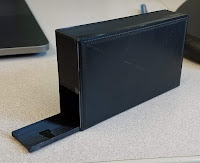
The 3D printed version

The students presented and demonstrated the fluorimeter/smart phone combo for their final chemistry lab this week. Look for future updates with photos of the device at work.


Monday, April 22, 2019

A Virtual Courtroom


In March,  EdTech hosted a two day VR showcase at our Law School.  As students walked by, we encouraged them to try out a VR experience on the Oculus Rift.  As usual "Richie's Plank Experience" was a big hit and great conversation starter.  And conversation is really what we're after as we explore the meaningful, educational aspects of virtual reality.

One conversation revolved around how we could leverage VR in a courtroom setting to help law students practice speaking to a judge and the court.  The idea here is that virtually practicing speaking could help a student be more polished when they have to speak in a real-life courtroom with real-life judges.

As fate would have it, the law student who presented this idea was able to secure time in a courtroom downtown.  Julio and I packed up our InstaPro 360 VR camera and spatial audio mics and headed to the Multnomah County Courthouse.  We were led to a courtroom where we set up our equipment,  had to opportunity to don Judge's robes, sit at the bench and silently impersonate a Judge for 15 minutes.  This was ok-ed by the real Judge, so I believe Julio and I are not in any legal trouble!

Afterwards,  I processed and edited the VR video and posted it to YouTube where, if you have a set of VR goggles, you can virtually be in the courtroom to experience what it's like to have judges and a bailiff stare at you for ten minutes while you practice speaking to them.

The video is fairly simple in it's current form.  The next step would be adding layers of interactivity to the video, like fielding questions from the judges or having virtual notes to guide as you speak.

If you, of the LC community, have an idea of how VR could enhance or complement your work, EdTech is all ears.  Grab some VR goggles and check out the video below:


https://youtu.be/QdyR7LrYCjI

Monday, January 14, 2019

3D Campus Visualization Project

Each blue square represents a photo taken from an aerial drone


Over the last semester, EdTech hired a student, Keegan Millbern '19, to create 3D images of academic buildings on the Lewis & Clark campus.  Keegan spoke of his interest in a technique called Photogrammetry which uses everyday photos of an object to create a 3D file that may be rotated and viewed from all angles.

The first trick is taking photos of a building from all angles--that means above the building and the upper stories.  To accomplish this, drone photography is ideal.  Because a good, modern drone has GPS sensors to keep it stationary, all that needs doing is to fly the drone at a chosen elevation and take hundreds of photos, change elevation and take even more photos!

The photos are then loaded into software called Agisoft Photoscan, which compiles the photos into a rough 3D representation of the building.  Ok, so there's quite a bit of refinement and massaging that happens, but eventually you end up with the 3D model of the building.

Keegan has completed several models so far and will continue working on them through the spring.  We in EdTech hope to use the models as part of a repository of digital assets that could be used for future projects involving Virtual/Augmented Reality tours, or simulations of natural disasters, or even campus facilities planning needs.

Click the link to see a video showcasing the models and methodology--Enjoy!

https://drive.google.com/a/lclark.edu/file/d/19YAlAMggPHpyI_qMAh5s60rKuG3K0wSQ/view?usp=sharing


Friday, March 23, 2018

Lightboard at the Grad School


A few weeks ago, EdTech brought the lightboard to the Graduate School!


Faculty, staff, and students were able to stop by York Commons to check it out, take a look at how it worked, and try it out for themselves.

Many excited students came by to play with the board and chat about some great ideas for implementing the board in their schools and counseling centers. Along with having the chance to write on the board with our colorful neon markers, students were also able to see how the lightboard effectively functioned in a classroom.

We pointed a camera towards the lightboard and showed the camera’s image on the TV in York Commons. Since people on the other side of the lightboard would see the writing backwards, the TV acted as a way to see what was being written on the board. The image on the TV was flipped horizontally, and those watching the lightboard during lectures could watch the TV, or a projector screen, to see both the person behind the lightboard, as well as the writing.

Students also had a chance to watch some recorded lightboard lectures created by Lewis and Clark College faculty. Recordings have become one of the lightboard's primary functions, allowing instructors to cover content outside of class in an interesting and interactive way, and then provide the recordings to the class for homework or study material. Some members of the LC community have recorded lectures in our TV Studio and shared them with their classes with much success.


As graduate students think about using the lightboard in their own classrooms and counseling spaces, we hope this success will continue to grow!

The TV Studio will be available for lightboard lecture recording over the week of March 26th - March 30th.

If you would like more information about the lightboard, or would like to schedule a time to record a lightboard lecture, please contact EdTech, at edtech@lclark.edu

Wednesday, January 3, 2018

2017 Faculty Technology Showcase Recap

On December 7th, Educational Technology once again hosted the annual Faculty Technology Showcase. The 2017 Showcase featured twelve presenters showcasing the variety of ways technology is being integrated into instruction, curriculum, and research. This was enough to give us a few challenges space-wise, a 'problem' we're more than happy to have! A full list of our presenters and descriptions is available at the Showcase website.

In addition to highlighting our faculty, Educational Technology brought in some new hardware we're hoping to see make its way into more classrooms in the near future. We featured a VR demo station, where which provided a hands-on look at theVive, Oculus Rift, Samsung Gear, and Google Cardboard systems. We also gave our laser engraver a live test run as well with promising results, and Chemistry faculty Casey Jones shared how she'd incorporated the classroom iPad set to better leverage online instructional demos.

Also seeing its debut at the Showcase was our freshly constructed lightboard. A lightboard is an DIY illuminated glass whiteboard used for recording video lectures while allowing the presenter to face their audience while presenting. Now that it's complete, we're looking forward to creating opportunities for faculty to create instructional videos.


Last, but certainly not least, we were glad to again offer an opportunity for our community to get together, celebrate success, swap ideas, and, of course, win prizes! At the end of the event, three lucky winners walked away with wireless headphones, a water-resistant Bluetooth speaker, and Amazon Echo Dot. All in all, a fun afternoon. Hope to see you all (and more) again next year!